
Follow the spoken sentence
The original PDF remains the reading surface while the active sentence is marked on its page. You keep visual context instead of switching between audio and a separate text view.
Read along, in place
Open an English text-layer PDF in your browser. Follow each spoken sentence on the original page, skip what interrupts you, and resume where you stopped. Built-in English voice needs no API key.
Try 5 minutes of voice as a guest on any supported page. Verify your email for 30 more generation minutes. No card needed.
Your PDF file stays in this browser. Built-in voice sends sentences through our server to DeepInfra; registered free listening may prefetch one, and paid listening up to two.
Audio loses the page
A reflowed reader or audio file can separate what you hear from the page you need to inspect. ReadAlongPDF.online keeps the source page visible and marks the sentence being spoken, so you can check a chart, formula, citation, or footnote without searching for your place again.
How it works
Choose an English text-layer PDF from this device. It is checked before you pay.
Listen briefly as a guest. An email sign-in link adds 30 generation minutes. No provider registration, API key, card, or separate top-up is needed for the trial.
Start from a sentence, control the queue, skip selected blocks, and resume locally later.
An example you can open
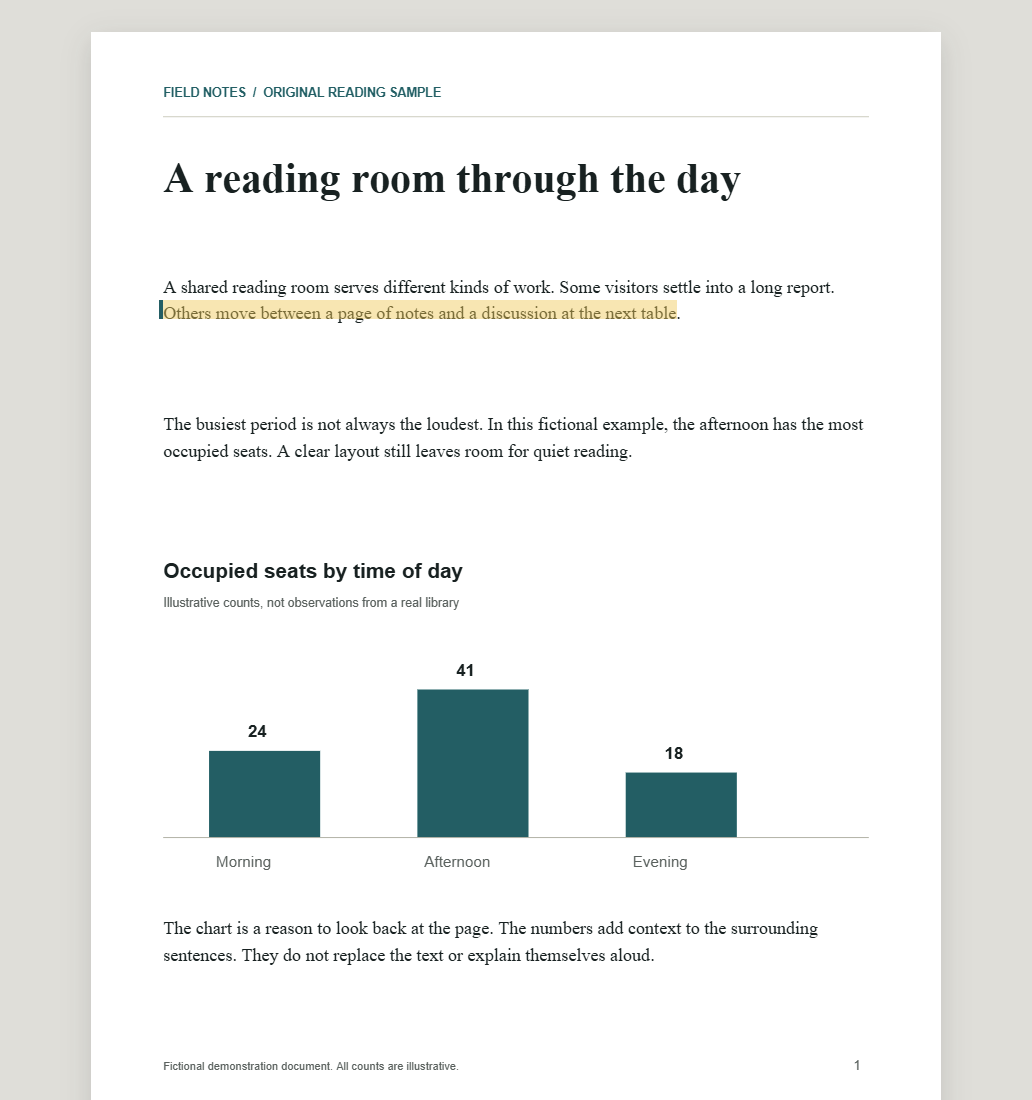
The screenshot above comes from the reader with this original two-page PDF. The selected sentence remains beside the surrounding text and chart.
“Others move between a page of notes and a discussion at the next table.”
The illustrated counts are fictional. This demonstrates page rendering and selection, not the interpretation of charts or a voice recording.
Selecting a sentence does not generate audio. Play uses the applicable voice allowance.
The page stays authoritative. The reader adds audio, position, and explicit choices around it.
The original PDF remains the reading surface while the active sentence is marked on its page. You keep visual context instead of switching between audio and a separate text view.
Preview the extracted sequence before playback and choose a different starting sentence when a complex layout is wrong.
Skip a sentence or block, or save a repeated header or footer rule for that document. ReadAlongPDF.online does not silently delete body text.
Keep the last page, sentence, speed, and skip rules in local browser storage. Browser storage can be cleared, so it is not a cloud backup.
Try a few minutes as a guest, then verify your email for more listening. No provider account or API key is needed. Your own compatible endpoint remains an optional advanced choice.
Local-first reading
PDF files, reading position, and skip rules stay in this browser. Built-in speech processes only the requested sentence and up to two ahead through ReadAlongPDF.online and DeepInfra. We do not store that text or audio in our application database. An optional BYO endpoint receives sentences directly from your browser instead.
See the full data flowYour document remains in this browser.
Requested text and permitted prefetch travel through our server to DeepInfra.
Generated audio uses your allowance; failed generation releases its reservation.
One-time V1 license
Start on your own file. Buy the reader once, then add voice only when you need it.
Check your PDF first
$0
For one reader
$29one time
Optional, after V1
$9per top-up
Allowances measure newly generated audio at 1× speed, including successful prefetch. Taxes may apply at checkout. Read all limits and charging details →
Before your first file
Compatibility, voice and local storage—clear before you begin.
Find a specific answer →The PDF file stays in your browser. Built-in voice sends the current sentence and up to two ahead through our server to DeepInfra. With an optional endpoint, sentences go directly to that provider.
V1 supports unencrypted English PDFs with a selectable text layer, up to 50 MB and 500 pages. Scanned, image-only, password-protected, damaged, and dynamic XFA PDFs are not supported.
No for built-in voice. Advanced users can optionally connect an HTTPS, CORS-enabled OpenAI-compatible speech endpoint and pay that provider separately.
Built-in voice needs no key from you. If you choose your own endpoint, its key stays in the current tab and is not written to local storage or our server.
The original chart or formula remains visible, but V1 does not interpret images or guarantee mathematical reading order. Check the original page whenever layout matters.
Not in V1. The supported launch browsers are the latest two stable major versions of desktop Chrome and Edge.
Listen on any supported page for up to 5 minutes of generated audio as a guest, once per browser identity. Verify your email for 30 additional minutes once per account. These are generation minutes, including successful prefetch, not guaranteed listening time. No card or separate provider account is needed. Free capacity may be temporarily full.
One person gets the V1 reading workflow on up to 3 active browser profiles, 12 months of feature updates, and 10 hours of built-in audio generation. Optional 20-hour top-ups cost $9. There is no automatic renewal or unlimited voice promise.
Yes. Request a full refund within 14 calendar days of purchase. There is no usage condition, and mandatory consumer rights still apply.
No. ReadAlongPDF.online includes keyboard controls and spoken reading, but it is not a certified assistive technology, medical product, or screen-reader replacement.
Check compatibility and hear the first sentence as a guest while the source page stays in view.
Open a PDF — Free PreviewNo card or email needed for the guest trial. Desktop Chrome or Edge required. Email verification adds 30 minutes.